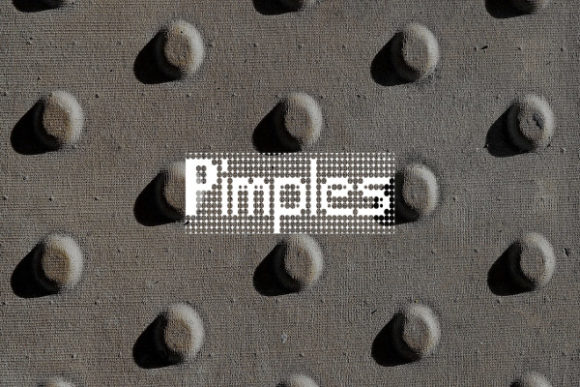
Pimples: A Pixelated Typeface with Character
Every once in a while, a typeface comes along that refuses to blend into the background—and instead, makes the background part of its charm. Pimples, created by designer Rikyozone, is exactly that kind of font. With its distinctive pixeled characters and built-in background effect, it offers something genuinely different from the sea of clean sans serifs and elegant scripts dominating today’s design landscape. If you’re working on a project that needs personality, nostalgia, or a bold visual statement, Pimples deserves a closer look.
What Makes Pimples Visually Unique?
At first glance, Pimples feels like a throwback to early digital design—the era of pixel art, retro gaming interfaces, and chunky screen fonts. But it’s more than just a retro novelty. The font’s characters are constructed with visible pixel grids, giving each letter a tactile, almost three-dimensional quality. The background texture integrated into the letterforms adds depth and visual interest that most display fonts simply don’t offer.
This isn’t a font you’d use for body copy in a legal document. It’s a display font designed for moments where you want text to command attention. Think headlines, logos, packaging callouts, or social media posts where stopping the scroll matters. The pixelated style also carries a sense of playfulness and approachability—qualities that can soften a brand’s tone without sacrificing professionalism.
Where Pimples Shines: Practical Applications
Understanding where a font works best is just as important as liking how it looks. Pimples has a surprisingly versatile range of uses, especially for projects that lean into creativity, youth culture, gaming, tech, or nostalgic aesthetics.
- Logo Design & Brand Identity: If your brand caters to gamers, tech enthusiasts, indie creators, or a younger demographic, Pimples can anchor a memorable visual identity. Its pixelated structure makes it instantly recognizable at small sizes—useful for app icons, favicon, or merchandise tags.
- Packaging Design: For food brands, craft products, or limited-edition releases, Pimples adds a handmade, artisanal quality. The textured background gives labels a tactile feel, even in digital mockups.
- Social Media Graphics: Instagram stories, YouTube thumbnails, TikTok overlays—these platforms reward bold, eye-catching text. Pimples’ chunky letterforms read well on mobile screens and stand out in crowded feeds.
- Posters & Event Invitations: Planning a retro-themed party, a gaming tournament, or a creative workshop? Pimples sets the mood immediately. Pair it with vibrant colors or dark backgrounds to maximize impact.
- Merchandise & Apparel: T-shirts, stickers, tote bags—merchandise often relies on fonts that look good printed on fabric or vinyl. Pimples’ clean pixel edges reproduce well across different printing methods.
- Website Headers & Blog Graphics: While you wouldn’t set an entire blog in Pimples, using it for section headers, pull quotes, or featured image text can break visual monotony and guide readers’ eyes.
- Editorial Layouts & Digital Products: Zines, digital magazines, e-book covers, and online course graphics can all benefit from a typeface that signals creativity and originality.
Pairing Pimples with Other Fonts
A display font like Pimples works best when balanced with complementary typefaces. Since it carries so much visual weight, pairing it with simpler fonts prevents designs from feeling cluttered.
For body text, consider a clean sans serif font like Open Sans, Lato, or Roboto. These neutral typefaces let Pimples’ personality take center stage without competing for attention. If your project calls for a more traditional feel, a readable serif font like Merriweather or Georgia can create an interesting contrast—modern pixels meet classic letterforms.
Avoid pairing Pimples with other highly decorative fonts. Two strong personalities in one design usually clash. Instead, let it be the star while supporting fonts handle the heavy lifting of readability.
When testing pairings, mock up actual content rather than just looking at alphabet samples. Set a headline in Pimples, then write a paragraph beneath it in your chosen body font. Check the visual rhythm—do the sizes feel proportional? Does the spacing between headline and body text feel natural? These small details separate amateur layouts from polished ones.
Readability Considerations
Pixel fonts occupy an interesting space in typography. At large sizes, they’re highly legible and visually engaging. At small sizes, however, the pixel structure can become muddy—especially on low-resolution screens or in print at fine scales.
A few practical guidelines:
- Use Pimples at larger sizes—typically 24pt and above for print, or 20px and above for web. This preserves the clarity of the pixel grid.
- Check contrast carefully. The font’s built-in background texture means it may not read well against busy or low-contrast backgrounds. Test it on light, dark, and colored backgrounds before finalizing.
- Consider your medium. On high-resolution screens (Retina displays, modern smartphones), pixel fonts render crisply. On lower-resolution screens or small print runs, edges may appear soft. Always proof in the final output format.
- Limit usage to key text elements. Headlines, logos, short phrases—these are Pimples’ sweet spot. Lengthy sentences or paragraphs in a pixel font fatigue readers quickly.
Licensing and Commercial Use
Before using any font in a commercial project, reviewing the license is essential. Pimples, like many creative fonts, may come with specific terms regarding commercial use, modification, and distribution. Some licenses cover unlimited personal use but require an upgrade for business applications—logos, client work, merchandise sales, or product packaging.
Always download fonts from the original creator or authorized distributors. This ensures you receive the correct files, up-to-date versions, and legitimate licensing documentation. If you’re a designer working with clients, clarify font licensing responsibilities upfront. Some licenses allow you to use the font in designs you deliver to clients; others require the client to purchase their own license.
For small business owners managing their own branding, investing in a premium font with clear commercial terms saves headaches later. The cost is usually modest compared to the legal risks of using unlicensed fonts—or the visual cost of relying solely on overused free options.
Making the Most of a Creative Typeface
Fonts like Pimples remind us that typography isn’t just about communication—it’s about feeling. A pixelated, textured typeface evokes specific emotions: nostalgia for early computing, excitement about gaming culture, appreciation for handcrafted digital art. When those emotions align with your brand or project goals, the right font becomes a powerful tool for connection.
The key is intentionality. Don’t choose Pimples just because it looks cool (though it does). Choose it because your audience responds to playful, retro-inspired visuals. Choose it because your brand personality leans toward the creative and unconventional. Choose it because you’ve tested it in context and it works.
Rikyozone created something genuinely distinctive with this typeface. In a world of interchangeable geometric sans serifs, Pimples offers texture, personality, and a nod to digital design history. Whether you’re building a brand from scratch, refreshing a social media presence, or designing packaging for a new product, it’s the kind of creative font that makes people pause—and that pause is often the first step toward engagement.